
Twitter — now officially called X — is one of the busiest social platforms on the internet. Every single day, millions of videos get posted, shared, and talked about. Funny clips. Breaking news footage. Sports highlights. Music previews. Short documentaries. You name it, and someone on X has posted it.
The problem? Twitter does not let you save those videos directly to your device. There is no built-in download button. You can bookmark a tweet, sure, but the moment you go offline or that tweet gets deleted, the video is just gone.
That is where a TWMate comes in.
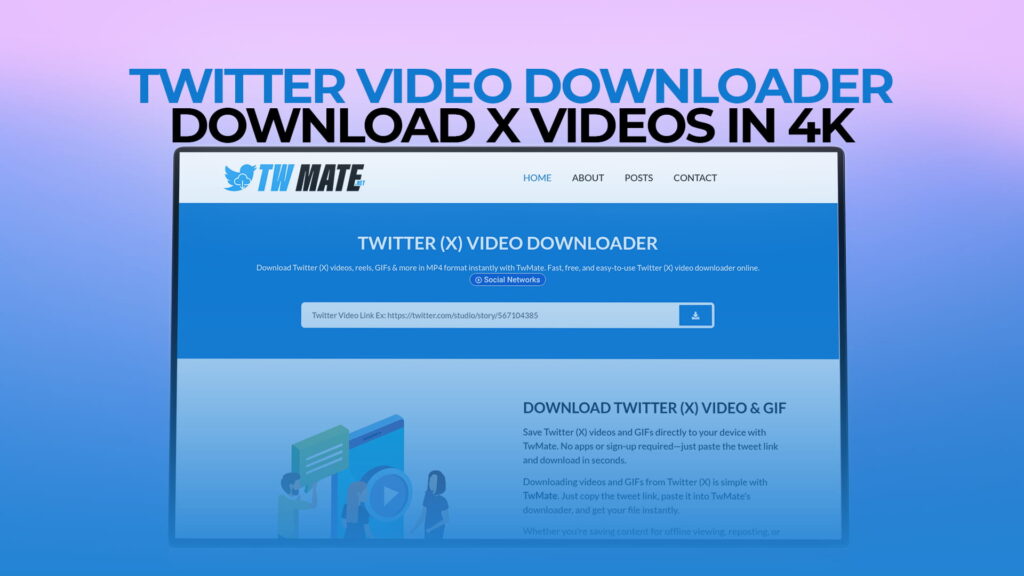
TWMate is a free online Twitter video downloader that lets you save videos, GIFs, and Reels from X straight to your phone, tablet, or computer — no account, no signup, no software to install. Just paste a link and download. It even supports 4K quality, which means you get the best possible version of whatever you are saving.
This guide covers everything you need to know about downloading Twitter videos: why people need to do it, how TWMate works, what makes it stand out from other tools, and some practical tips to get the most out of it.
Why People Download Twitter Videos
Before getting into the how, it is worth understanding the why. Downloading Twitter videos is not something people do out of boredom. There are real, everyday reasons behind it.
Saving content for offline viewing. Mobile data is not always available. If you are about to travel, hop on a plane, or move through an area with poor signal, having a video saved locally means you can watch it whenever you want. No buffering, no loading screens, just the video.
Keeping memories and records. People post personal videos on Twitter all the time — wedding clips, graduation moments, baby milestones. When a loved one shares something special, you might want to hold onto it. Twitter does not archive things forever, and accounts can be deleted. A downloaded copy is yours to keep.
Research and journalism. Reporters, bloggers, content researchers, and academics often need to pull video content from social media as evidence or reference material. Having the file locally makes it easier to review frame by frame, include in presentations, or store alongside other research materials.
Educational purposes. Teachers and students sometimes use video clips from Twitter for class projects, demonstrations, or explainer content. Being able to save those clips without hunting for them again later saves time.
Sharing across platforms. Not everyone uses Twitter. If you find a great video on X but your audience is on WhatsApp, Telegram, or Instagram, downloading and resharing lets you bring that content to where your people actually are.
Memes and entertainment. Some videos just need to be saved. The internet has a very short memory, and the funniest clips disappear fast. If something makes you laugh hard enough to want to show it to someone next week, downloading is the only reliable way.
What Is TWMate?
TWMate is a browser-based video downloading tool built specifically for Twitter and X. You visit the site, paste in the URL of a tweet that contains a video, and TWMate fetches the video file so you can download it to your device.
It is completely free to use. You do not need to create an account. You do not need to hand over your email address or phone number. There is nothing to install, no browser extension required, and no hidden fees that show up after a few downloads.
The tool works with:
- Twitter/X videos — any video posted natively on the platform
- GIFs — those short looping animations that are everywhere on X
- Reels — short-form video content shared on the platform
- Videos in replies and threads — not just main tweet videos
- 4K videos — when the original was uploaded in high resolution, TWMate can pull the 4K version
That last point matters more than it might seem. A lot of downloaders only pull the compressed, lower-quality version of a video. TWMate goes after the original quality file, which means if the creator posted in 4K, you get 4K.
How to Use TWMate to Download Twitter Videos
The process is short and simple. Here is exactly how it works.
Step 1: Find the Tweet
Go to Twitter or X and find the tweet that contains the video you want to download. This could be anything — a news clip, a sports moment, a comedy sketch, whatever you are looking for.
Step 2: Copy the Tweet URL
On desktop, you can copy the URL directly from your browser’s address bar when you click on the tweet. On mobile, tap the share icon on the tweet (it looks like an upload arrow) and select “Copy Link.” That puts the tweet URL onto your clipboard.
Step 3: Open TWMate
Go to TWMate in your browser. The site loads fast and the interface is clean — there is no clutter, no pop-ups blocking your screen, just a straightforward input box waiting for your link.
Step 4: Paste the Link and Click Download
Paste the tweet URL into the input field and click the download button. TWMate processes the link and within a few seconds, it shows you the available download options.
Step 5: Choose Your Quality and Save
You will usually see multiple quality options — things like 1080p, 720p, 480p, and sometimes 4K if the original was uploaded in that resolution. Pick the quality you want. For best results, always go for the highest available option. Click download and the file saves to your device.
That is the entire process. No extra steps, no sign-in walls, no tricks.
Downloading Twitter GIFs with TWMate
GIFs on Twitter are a bit different from regular videos. Technically, Twitter converts GIFs to MP4 files when they are uploaded, which is why they play silently and loop automatically. When you download a Twitter GIF through TWMate, you get that MP4 file.
If you specifically want the GIF format (the actual .gif file), you can convert it afterward using any free online GIF converter. But most people find the MP4 version perfectly fine since it plays on every device and app without issues.
The process for downloading GIFs is the same as for videos. Copy the tweet link, paste it into TWMate, and download. Done.
Does TWMate Support 4K Downloads?
Yes, and this is one of the things that separates TWMate from a lot of similar tools.
When someone uploads a video to Twitter in 4K resolution, the platform stores that high-resolution file even though it might display a compressed version in your feed. TWMate is able to access that original high-quality file and offer it as a download option.
This matters if you are someone who cares about video quality — filmmakers, content creators, journalists pulling b-roll footage, or just anyone who wants the crispest version of a clip. Standard Twitter downloads often come out blurry or pixelated because lower-quality tools only grab the preview version. With TWMate, you get the real thing.
Keep in mind that 4K files are larger, so make sure you have enough storage on your device before downloading several of them.
Is TWMate Safe to Use?
This is a fair question to ask about any online tool, especially one that involves pasting links into a website.
TWMate does not ask for your Twitter login credentials. It does not need access to your account. The tool works entirely by reading the publicly available tweet URL you provide — it is essentially doing what your browser does when it loads a tweet, just with the added step of extracting the video file.
Here are a few practical safety tips when using any online downloader:
Only download public content. TWMate can only fetch videos from public tweets. If a tweet is from a private account, the tool will not be able to access it. This is actually a good thing from a privacy standpoint — the tool respects account privacy settings.
Use a modern browser. Any up-to-date browser (Chrome, Firefox, Safari, Edge) works with TWMate. Your browser’s built-in security features protect you during any web session.
Be mindful of copyright. Just because you can download a video does not mean you have unlimited rights to do whatever you want with it. Saving for personal use is generally fine. Republishing someone else’s content, especially for commercial purposes, is a different matter and something to be careful about.
Using TWMate on Mobile
A lot of people discover they want to download a Twitter video while scrolling on their phone. The good news is that TWMate works just as well on mobile as on desktop.
On iPhone or Android, open your browser and go to TWMate. Paste in the tweet link, hit download, and when the video file appears, tap and hold it to save it to your photos or files. On some Android devices, the file will automatically go to your Downloads folder.
If you are on iOS and the video does not save to your Camera Roll automatically, try using Safari and follow any prompts to save to Files, then move it from there.
There is no app to install. The mobile browser version works cleanly and the interface adjusts to fit your screen.
TWMate vs. Other Twitter Video Downloaders
There are quite a few tools online that claim to download Twitter videos. Here is how TWMate compares on the things that actually matter:
4K Support. Many downloaders cap out at 720p or 1080p. TWMate supports 4K when available, which puts it ahead of most competitors for anyone who cares about resolution.
No Registration. Some tools require you to sign up before you can download, which is unnecessary friction and raises privacy questions. TWMate asks for nothing. You use it and you leave.
Speed. Processing is fast. You paste a link and within a couple of seconds, the download options are ready. There is no waiting around.
GIF Support. Not every Twitter downloader handles GIFs properly. TWMate does.
Clean Interface. Some download tools are buried under ads, fake download buttons, and pop-ups designed to trick you into clicking the wrong thing. TWMate keeps it clean and straightforward.
No Watermarks. The downloaded file is the original video file. There is no TWMate watermark slapped over your footage.
What Types of Content Can You Download?
TWMate covers most of what you would encounter on Twitter and X:
Native Videos — Videos that were uploaded directly to Twitter. This is the most common type and TWMate handles these with no trouble.
GIFs — Looping silent animations, saved as MP4 format.
Short Reels / Clips — Shorter-form video content that has become more common as Twitter/X has pushed its video features.
Videos in Tweet Threads — If a video appears in a reply within a thread, you can still copy that specific tweet’s URL and download it.
One thing worth noting: TWMate works with content from Twitter/X specifically. It is not a general-purpose video downloader for every website out there — it is built for X, and it does that job well.
Tips for Better Downloads
A few things that help get the most out of TWMate:
Always grab the highest quality available. Once a video is saved at a lower resolution, you cannot go back and get a better version without downloading it again. Pick the best option first.
Download sooner rather than later. Tweets get deleted. Accounts get suspended. If there is a video you want to keep, do not wait. Download it while it is still there.
Check your storage first. 4K video files can be large. Before starting a batch of downloads, make sure your device has enough space.
Use a stable internet connection for large files. A shaky Wi-Fi connection mid-download can corrupt the file or stall the process. Start big downloads when you are on a reliable network.
Organize your downloads. If you download a lot of video content for research or work, set up a folder system from the start. It is much easier than sorting through a flat list of files later.
Common Uses for Downloaded Twitter Videos
People use downloaded Twitter videos in more ways than you might expect. Here are some real scenarios:
Content creators save reference clips to study editing styles, transitions, or storytelling techniques. Having the file locally makes it easy to scrub through frame by frame.
Teachers and educators pull short clips to use in classroom presentations or as examples during lessons. A 15-second clip explaining a concept is often more effective than a paragraph of text.
Social media managers sometimes save competitor content or industry examples to review during strategy sessions.
Journalists and bloggers use downloaded clips as evidence in reporting, especially for quickly unfolding stories where original tweets might be deleted before the piece is published.
Sports fans save highlight clips, game moments, and post-game reactions that they want to watch again or share with friends on different platforms.
Families and friends save personal videos shared on X — graduation clips, travel moments, milestone events — especially when they know the account might not stay active forever.
Yes. TWMate is free with no hidden costs, no premium plans, and no per-download limits. You do not need to register or pay anything. Visit the site, paste your link, and download as many videos as you need.
No. TWMate is a browser-based tool, which means it runs entirely online. There is nothing to download or install on your computer, tablet, or phone. Any standard browser — Chrome, Firefox, Safari, Edge — will work fine.
No. TWMate can only access videos from public tweets. If a Twitter/X account is set to private, their content is not publicly accessible, and TWMate will not be able to retrieve it. This is consistent with respecting user privacy settings on the platform.
TWMate supports multiple quality options depending on what the original uploader posted. This can include 480p, 720p, 1080p, and 4K resolution. When a 4K version is available, TWMate makes it available for download. You can choose whichever resolution fits your needs.
Downloading videos for personal use from publicly accessible content is generally accepted, but the legal specifics vary by country and context. If you intend to redistribute, publish, or use someone else’s video commercially, you should check copyright law in your jurisdiction and ideally get permission from the original creator. TWMate itself is a neutral tool — how you use the downloaded content is your responsibility.
Final Thoughts
Twitter and X have become one of the biggest archives of video content on the internet. News, culture, sports, entertainment, education — it all flows through that platform in video form every single day. The platform just does not make it easy to hold onto any of it.
TWMate solves that problem simply and cleanly. Paste a link, pick a quality, download a file. No account, no software, no cost. It handles regular videos, GIFs, and Reels, and it goes all the way up to 4K when the source video supports it.
Whether you are a journalist saving clips for a story, a fan holding onto a sports moment, a creator building a reference library, or just someone who found something funny and wants to keep it — TWMate gives you a fast, reliable way to do that.
The next time you come across a video on X that you want to save, you know where to go.