
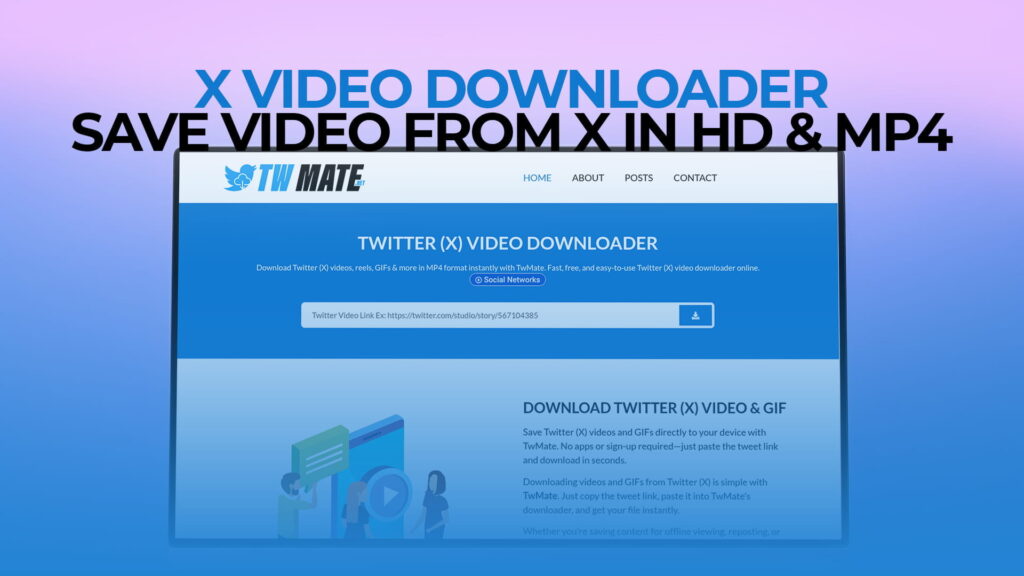
X, the platform formerly known as Twitter, moves fast. One minute a video is trending, the next it is buried under a hundred newer posts. If you have ever tried to save a video from X and found no way to do it through the app itself, you are not alone. X does not offer a native download option for most videos. That gap is exactly what TWMate fills.
TWMate is a free online tool that lets you download videos, GIFs, Reels, and other media from X without creating an account or paying anything. You can find it at twmate.net. This guide explains how it works, how to use it, and everything else worth knowing before you get started.
Why X Does Not Let You Download Videos
X is built around real-time content. The business model depends on you opening the app, scrolling, and spending time there. Giving you a way to take videos off the platform and watch them elsewhere cuts against that goal.
So X keeps things locked down. You can repost, quote, like, and bookmark. But downloading a video to your phone or computer is not something X gives you a button for. Even the official X Premium subscription does not include a download feature for most content.
This means anyone who wants to save a video for offline viewing, archive something important, or keep a clip for reference has to look outside the app. TWMate exists for exactly that reason.
What Is TWMate?
TWMate is a free, browser-based X video downloader. No software installation required. No account to create. No subscription fee.
You bring the link. TWMate fetches the video. You download the file.
It supports a wide range of content types from X:
- Standard videos — Regular video posts from any public X account
- Twitter/X Reels — Short-form video content
- GIFs — Animated GIFs posted on X (these are technically video files on X’s servers)
- HD videos — Where the original upload was in high definition, TWMate can pull that version
- MP4 format — Downloads are typically delivered in MP4, which plays on virtually every device
The tool works on any device with a browser. Whether you are on a phone, tablet, laptop, or desktop, the process is the same.
How to Download X Videos Using TWMate
The steps are short. Once you have done it once, it takes about thirty seconds.
Step 1: Find the Video on X
Open X (formerly Twitter) on your phone or in a browser. Navigate to the video you want to download. This can be a regular video post, a Reel, or a GIF.
Step 2: Copy the Post Link
On the X mobile app: Tap the share icon at the bottom of the post (it looks like an arrow pointing upward). A menu will appear. Tap “Copy Link.” The URL is now saved to your clipboard.
On X in a browser: Click the share icon on the post. Select “Copy link to post.” You can also click on the post’s timestamp (the date or time shown under the username) — that opens the individual post page and you can copy the URL from your browser’s address bar.
Step 3: Open TWMate
Go to twmate.net in your browser. The page loads fast and you will see an input field ready for a link.
Step 4: Paste the Link
Tap or click inside the input field and paste the link you copied. On mobile, long-press the field and tap “Paste.” On desktop, use Ctrl+V (Windows) or Cmd+V (Mac).
Step 5: Click Download
Hit the download button. TWMate will process the URL and pull the video from X’s servers. This usually takes a few seconds.
Step 6: Choose Your Quality and Save
If the original video was uploaded in multiple resolutions, TWMate may give you options — for example, SD (standard definition) and HD (high definition). Select the quality you want. Then tap or click the download link to save the file to your device.
On most phones, the file goes to your Downloads folder or directly to your camera roll, depending on your device and browser settings. On desktop, it saves to wherever your browser is configured to put downloads — usually the Downloads folder.
Downloading X Videos in HD
If the account that posted the video uploaded it in high definition, TWMate can fetch that version for you. When you process a link, the tool will show you the available quality options. The highest available is usually listed first or labeled clearly.
A few things that affect the quality of your download:
The original upload quality matters most. TWMate downloads what X has. If the video was uploaded in 480p, there is no way to get it in 1080p — that data simply does not exist on X’s servers. But if it was uploaded in HD and you select the HD option in TWMate, you will get the best version available.
X compresses videos on upload. Like most social platforms, X re-encodes videos when users upload them. This means even an “HD” download from X may not be as sharp as the original source file. That is an X limitation, not a TWMate one.
MP4 is the standard format. MP4 files are compatible with almost everything — phones, tablets, smart TVs, laptops, video editing software, and media players. TWMate delivers downloads in MP4, which means you should be able to open and use the file on any device without converting it.
Downloading GIFs from X
GIFs on X are a bit different from what most people expect. When you see something labeled as a GIF on X, it is actually a looping video file (usually an MP4 or similar format) that X converts and displays as an animation. The actual “.gif” file format is rarely used directly on the platform because it is too large and inefficient.
When you download a GIF from X using TWMate, you will typically get an MP4 file that loops. This plays fine on almost every device. If you specifically need a .gif file for some other purpose (like embedding in a presentation or website), you would need to convert the MP4 afterward using a separate tool.
Downloading a GIF from X works exactly the same way as downloading a regular video — copy the post link, paste it into TWMate, and download.
Does TWMate Require Registration?
No. You do not need to create an account, enter an email address, or agree to a trial period. TWMate is free to use without any registration at all.
This matters for a few reasons. First, it is faster — you do not have to go through a sign-up process before you can use the tool. Second, it is more private — you are not handing over personal information to use a basic download function.
Just go to twmate.net, paste your link, and download. That is the whole thing.
Is TWMate Safe to Use?
Safety is a reasonable concern when using any third-party web tool.
TWMate works by processing the public URL you provide. You are giving it a link to a post, not any personal information. The tool does not ask for your X username or password at any point. If any downloader tool ever asks for your social media login credentials, that is a red flag — legitimate tools do not need your password to download a public video.
A few habits that keep things safe when using any online downloader:
- Make sure you are actually on the right website before pasting anything
- Do not enter any personal account login information
- Use a browser you keep updated, as modern browsers have built-in protections against malicious scripts
TWMate is free and browser-based, which means your device is not downloading any software or extensions. The file you download is just a media file — the same video that anyone with a browser could view on X.
What Can You Download from X Using TWMate?
Here is a more complete breakdown of the content types TWMate supports:
Regular Video Posts
Any standard video posted to X from a public account. News clips, sports highlights, music videos, tutorials, personal vlogs — if it is a public post with video, you can download it.
X Reels
Short-form vertical videos on X work the same as other video posts. Copy the link, paste into TWMate, download.
GIFs
As mentioned above, X GIFs are actually video files. TWMate downloads them as MP4 files. They play and loop just like GIFs but in a more efficient format.
Videos from Threads
If a tweet thread includes a video in one of the replies or posts, you can copy the link to that specific post and download its video the same way.
Videos from X Spaces Recordings
Some recorded X Spaces are posted as video or audio clips. Where these are available as public video posts, TWMate can handle them.
One important note: TWMate only works with content from public accounts. Private accounts, protected tweets, and content that requires an X login to view cannot be downloaded — the tool has no way to access content that is not publicly available.
Supported Devices and Browsers
TWMate works in any modern web browser. That includes:
- iPhone and iPad — Safari, Chrome, Firefox, Edge
- Android phones and tablets — Chrome, Firefox, Samsung Internet, Opera
- Windows — Chrome, Edge, Firefox, Brave, Opera
- Mac — Safari, Chrome, Firefox, Edge
- Linux — Chrome, Firefox
No browser extension or plugin is required. The website is responsive, meaning it adjusts to whatever screen size you are using.
A note for iPhone users: Safari on iOS sometimes opens downloaded videos in a new tab instead of saving them directly. If that happens, long-press the video in the tab and look for an option like “Save to Photos” or “Download Linked File.” Alternatively, using Chrome on iPhone often results in a more direct download experience.
How TWMate Compares to Other Methods
Versus Screen Recording
Screen recording is the most common workaround people use when there is no download button. It works, but the results are noticeably worse than a proper download.
When you screen record a video, you are capturing what is displayed on your screen — not the actual video file. The quality depends on your screen resolution, your recording settings, and whether your phone throttled performance in the background. You also capture everything else visible on your screen, including the X interface, your battery indicator, and any notifications that pop up during recording.
Downloading through TWMate gives you the actual video file at its original resolution. No interface clutter, no screen-recording artifacts, no captured notifications.
Versus Other Online Downloaders
Several X video downloaders exist online. Some are reliable; others are not. Common problems with lower-quality tools include:
- Requiring account registration before downloading
- Limiting the number of free downloads before pushing a paid plan
- Showing aggressive or misleading advertising
- Redirecting through multiple pages before reaching the download
- Not supporting GIFs or Reels
TWMate handles all the major X content types, requires no registration, and keeps the process clean. You paste a link, you get a file.
Why People Download Videos from X
The reasons vary, and most of them are completely ordinary.
Offline access. A lot of valuable content lives on X — educational threads with embedded clips, tutorials, news footage, commentary. If you travel frequently, live somewhere with inconsistent internet, or just want to watch something without burning mobile data, downloading makes sense.
Archiving your own content. If you post videos on X, your account is the only place those videos exist unless you back them up yourself. Accounts can get suspended, hacked, or lose content due to platform changes. Downloading your own posts is just good practice.
Saving content before it disappears. Posts get deleted all the time — by the user, by X’s moderation team, or because an account is taken down. If you see something you want to keep, saving it when you see it is the only reliable option.
Research and journalism. Reporters, researchers, and analysts regularly need to save social media content as evidence, source material, or documentation. A downloaded file is more reliable than a screenshot and easier to share internally than a live link.
Using clips in other projects. Creators sometimes clip and remix content (with permission) for commentary, reaction videos, or educational purposes. Downloading the original file is step one of that process.
Sharing in places where links do not embed. Some platforms, group chats, and tools do not render X links. Attaching an MP4 file is more universally compatible.
Copyright and Responsible Use
This is worth addressing directly, because it comes up whenever downloading tools are discussed.
Videos posted on X are created by real people. When you download someone else’s video, you are downloading their work. Copyright law generally allows you to download content for personal, non-commercial use — watching something offline, keeping it for reference, archiving it for your own records. Most legal systems treat this similarly to recording something off TV for personal viewing.
Where it becomes a problem is when you take someone else’s video and re-upload it to another platform, use it commercially, or redistribute it in a way that takes value away from the original creator.
The practical guideline:
- Downloading for personal use is fine in most cases
- Re-uploading someone else’s content without permission is not
- If you want to share a video publicly, sharing the original X link respects the creator and their view count
- If you are a business using downloaded content in any way, get explicit permission
TWMate is a neutral tool. What you do with a downloaded file is your responsibility.
Tips for a Smoother Download Experience
A few things that make the process more reliable:
Copy the link directly from the post. Do not copy links from forwarded messages or shortened URLs if you can avoid it. The original post URL is the most reliable input for TWMate.
Check that the account is public. Before trying to download, confirm the account is not protected. If a padlock icon appears next to the username on X, the account is private and its content cannot be downloaded by anyone who does not follow it.
Use a stable internet connection. HD video files can be large. A stable WiFi connection gives you a faster, more reliable download than cellular data, especially for longer videos.
Try a different browser if something is not working. Occasionally, browser settings or extensions (like ad blockers) can interfere with download behavior. If your first attempt does not work as expected, trying a different browser often solves it.
Download promptly. Posts get deleted. If you see a video you need to save, do not wait — copy the link and download it while it is still live.
A Quick Walkthrough for First-Time Users
If you have never used an online video downloader before, here is the full process in plain terms:
- Open X and find a video post you want to save
- Tap the share icon on the post → tap “Copy Link”
- Open a new browser tab and go to twmate.net
- Tap the input box and paste the link (long-press → Paste on mobile; Ctrl+V or Cmd+V on desktop)
- Tap or click the Download button
- Wait a few seconds while the tool processes the link
- When the download options appear, choose HD if available
- Tap the download link — the file saves to your device
Total time: roughly 30 to 60 seconds. After the first time, it feels even faster because you know exactly what to expect.
Yes. TWMate is free to use with no hidden charges, no subscription, and no download limits. You do not need to register, pay, or provide any personal information. Go to twmate.net, paste a link, and download — that is it.
Yes. TWMate downloads videos in MP4 format by default. MP4 is one of the most widely compatible video formats available, meaning the file will play on iPhones, Android phones, Windows, Mac, smart TVs, and virtually any other device or media player without needing to convert it.
TWMate can only access content that is publicly available on X. If an account is protected (private), its posts are hidden from anyone who does not follow that account. Since TWMate works without logging into X, it has no way to access private content. Only public posts can be downloaded.
Yes. TWMate works in any browser on iPhone, including Safari, Chrome, and Firefox. However, Safari on iOS sometimes opens videos in a new tab rather than downloading them directly to your camera roll. If that happens, long-press the video playing in the tab and select “Save to Photos” or “Download Linked File” to save it locally. Using Chrome on iPhone often makes this process more straightforward.
Yes. GIFs on X are stored and served as video files (usually MP4 format), and TWMate downloads them as such. The file you get will be an MP4 that loops just like a GIF. If you need an actual .gif file for a specific purpose — like embedding in a website or presentation — you would need to convert the MP4 file afterward using a separate conversion tool.
Closing Thoughts
X is not going to add a download button anytime soon. The platform’s entire design is oriented around keeping you engaged on the app, and a built-in download feature works against that. That is not a criticism — it is just how social media platforms are built.
For everything the app does not offer, TWMate at twmate.net fills the gap. Free, fast, no registration, and it works on every device. Whether you are saving a clip for offline viewing, archiving your own content, downloading a GIF, or pulling an HD video for reference, the process takes under a minute.
Copy the link. Paste it into TWMate. Download the file. That is the whole thing.