
If you have ever scrolled through Twitter (now officially known as X) and stumbled upon a really funny, interesting, or useful GIF that you wanted to save, you already know the frustration. Twitter does not give you a built-in option to download GIFs directly to your phone or computer. You can like it, retweet it, or bookmark it — but downloading it? That is a completely different story.
This is where a reliable Twitter GIF downloader becomes not just useful, but absolutely essential. Whether you are a content creator who wants to repurpose trending GIFs, a social media manager building a library of animated content, or just someone who wants to save a funny moment to share with friends, having the right tool makes all the difference.
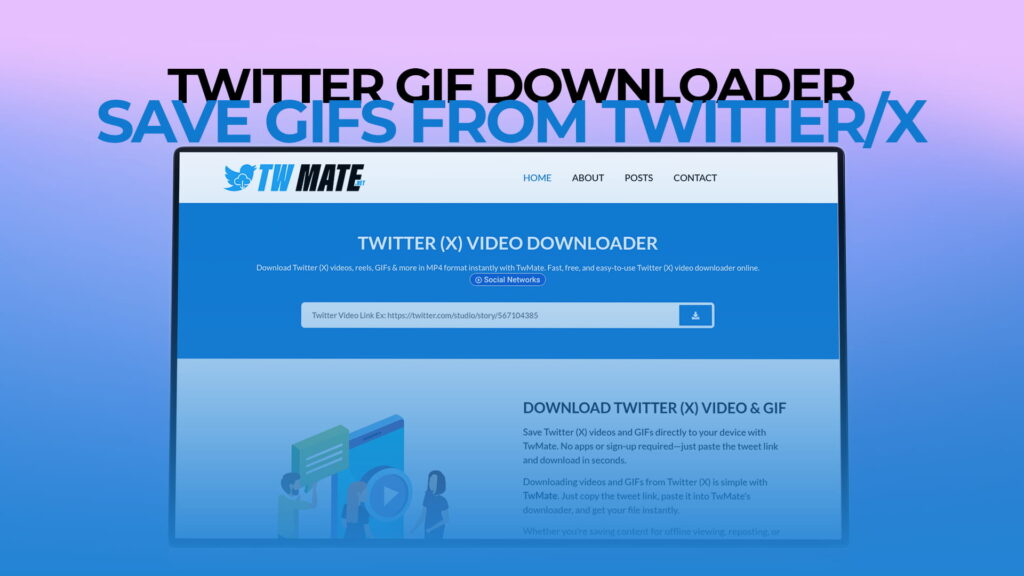
TWMate is one of the best and most trusted free tools available today that lets you download GIFs from Twitter and X with zero fuss. You do not need to create an account, download any app, or pay a single cent. Just visit TWMate, paste the link, and your GIF is ready to save in seconds. In this article, we will walk you through everything you need to know — what TWMate is, how it works, why it stands out, and how you can get the most out of it.
What Is TWMate?
TWMate is a completely free online media downloader that is specifically designed to help users save content from Twitter and X. It supports a wide range of content types including Twitter videos, Reels, GIFs, images, and more — all without requiring you to register for an account or install any software.
The platform is built with simplicity in mind. Anyone can use it — from tech-savvy professionals to people who are not very comfortable with online tools. The process is fast, the interface is clean, and the results are consistently reliable.
What makes TWMate particularly appealing is that it works on every type of device. Whether you are using a desktop computer, a laptop, a smartphone, or a tablet, TWMate works seamlessly across all platforms and browsers. This makes it one of the most accessible tools in its category.
In a world full of complicated and ad-heavy downloaders that require registration or trick you into installing unwanted software, TWMate keeps things refreshingly simple and transparent.
Why Twitter Does Not Allow Direct GIF Downloads
Before we dive deeper into how TWMate works, it is worth understanding why Twitter does not offer a native download option for GIFs in the first place.
Twitter treats GIFs differently from standard images. When you upload a GIF to Twitter, the platform actually converts it into a video file format (MP4) for faster loading and better performance. This means that what you see playing on your timeline is not technically a traditional GIF file — it is a looping video clip that behaves like one.
Because of this conversion, there is no simple right-click-and-save option for GIFs on Twitter the way there might be on some other websites. The content is embedded in Twitter’s own media servers, and accessing it directly requires a workaround.
That workaround is exactly what TWMate provides. It extracts the media file from Twitter’s servers and makes it available for download in a format that you can save to your device.
How TWMate Works: A Step-by-Step Guide
Using TWMate to download a GIF from Twitter is incredibly simple. Here is a full, step-by-step breakdown of the process:
Step 1: Find the GIF You Want to Download
Open Twitter or X on your browser or app. Scroll through your feed until you find the GIF you want to save. It could be in a tweet, a reply, or a thread — it does not matter where the GIF appears.
Step 2: Copy the Tweet URL
Once you have found the GIF, you need to copy the link to the tweet that contains it. Here is how to do it depending on your device:
- On a desktop browser: Click the three dots (more options) at the top right of the tweet, then click “Copy link to Tweet.”
- On the Twitter mobile app: Tap the share icon at the bottom of the tweet, then tap “Copy link.”
- On a mobile browser: Long-press on the tweet and look for an option to copy the URL from your browser’s address bar.
Step 3: Visit TWMate
Open a new browser tab and go to TWMate. You will be greeted by a simple, user-friendly interface with a text field at the center of the page.
Step 4: Paste the Link
Click on the input field on the TWMate homepage and paste the URL you just copied from Twitter. You can usually do this by pressing Ctrl+V on a keyboard or long-pressing the field on mobile and tapping “Paste.”
Step 5: Click the Download Button
After pasting the link, click the download button. TWMate will process the link and quickly fetch the media content from the tweet. In a few seconds, you will see a download option appear on the screen.
Step 6: Save the GIF to Your Device
Click on the download link or button provided by TWMate to save the GIF to your device. On most browsers and devices, the file will automatically save to your Downloads folder. You can then move it anywhere you like.
That is all there is to it. The entire process typically takes less than thirty seconds from start to finish.
Key Features of TWMate That Make It Stand Out
There are many Twitter media downloaders available online, so what makes TWMate worth choosing over the rest? Let us look at the features that set it apart.
Completely Free to Use
TWMate does not charge you anything. There are no premium tiers, no subscription fees, and no hidden costs. Every feature it offers is available to every user at no cost whatsoever. This is a major advantage, especially for people who only need to download GIFs occasionally and do not want to commit to a paid service.
No Registration Required
Some download tools ask you to create an account before you can access their services. TWMate skips all of that. You can start downloading GIFs right away without entering your email address, creating a username, or giving away any personal information. This keeps the experience fast and your privacy protected.
Works Without Installing Any Software
There is nothing to install. TWMate is a web-based tool, which means it runs entirely in your browser. This is great for people who are cautious about downloading new apps or software onto their devices, or for those who are using a shared or public computer.
Supports Multiple Content Types
While this article focuses on GIFs, TWMate is not a one-trick pony. It supports downloading Twitter videos, Reels, GIFs, and more. This makes it a versatile all-in-one tool for anyone who regularly consumes and wants to save media content from Twitter and X.
Compatible with All Devices and Browsers
Whether you are on an iPhone, an Android phone, a Windows laptop, or a Mac, TWMate works flawlessly. It is optimized for mobile devices as well as desktops, and it works across all major browsers including Chrome, Firefox, Safari, and Edge.
Fast Processing Speed
TWMate processes your download request very quickly. You do not have to wait around for minutes on end. Most downloads are ready within a few seconds of submitting the link, which makes it a highly efficient tool for regular use.
Clean and Easy-to-Use Interface
The design of TWMate is intentionally simple. There are no confusing menus, no unnecessary steps, and no overwhelming clutter. This makes it suitable for users of all ages and technical skill levels.
Safe and Secure
TWMate is a trusted tool that does not ask for unnecessary permissions or collect your personal data. It simply takes the Twitter link you provide and retrieves the media file associated with it. Your device and data remain safe throughout the process.
Who Can Benefit from Using TWMate?
TWMate is useful for a surprisingly wide range of people. Here are just a few examples of who might use a Twitter GIF downloader on a regular basis.
Content Creators and Influencers
If you are building an online presence, GIFs are an incredible tool for engagement. Being able to save trending GIFs from Twitter allows you to repurpose them across platforms like Instagram, Facebook, WhatsApp, or even in blog posts and presentations. TWMate makes this process effortless.
Social Media Managers
People who manage social media accounts for businesses or individuals often need a library of ready-to-use media content. Downloading relevant and trending GIFs from Twitter helps build this library quickly and easily without having to create everything from scratch.
Teachers and Educators
GIFs are increasingly used in educational content to make lessons more engaging and entertaining. Teachers who want to incorporate animated content from Twitter into their presentations or classroom materials will find TWMate extremely helpful.
Journalists and Bloggers
Reporters and bloggers frequently embed tweets in their articles to support their stories. Having the ability to download GIFs from Twitter ensures that even if the original tweet is deleted, the media content is preserved for reference or publication.
Casual Users
Of course, not every use case is professional. Many people simply want to save a funny GIF they found on Twitter to share in a group chat or keep for personal enjoyment. TWMate makes that completely possible and hassle-free.
Digital Marketers
GIF marketing is a real and growing field. Marketers who use GIFs in email campaigns, blog posts, or digital ads benefit from being able to download and repurpose trending content from Twitter.
How to Find Great GIFs on Twitter/X to Download
Now that you know how to download GIFs using TWMate, here are some tips for finding great GIFs on Twitter in the first place.
Use Twitter’s Search and Filter Tools
Twitter has a built-in search feature that you can use to find GIFs on specific topics. Simply enter a keyword in the search bar and then use the filter options to narrow results down to media content. This helps you find animated content that is relevant to your interests.
Follow Trending Topics
The Trending section on Twitter is one of the best places to discover viral content, including popular GIFs. When a topic is trending, there are usually many tweets with GIFs related to it that you can explore and download.
Explore Specific Accounts
Many Twitter accounts specialize in sharing GIFs, such as entertainment pages, meme accounts, sports highlights channels, and more. Following these accounts gives you a constant stream of fresh GIF content.
Check Replies and Threads
Some of the best GIFs on Twitter are found not in main tweets but in replies and comment threads. When people have conversations on Twitter, they often use GIFs to react or respond, and some of these can be gold.
Tips for Getting the Best Results with TWMate
To ensure the best experience when using TWMate, keep the following tips in mind.
Always Copy the Full Tweet URL
Make sure you are copying the URL of the specific tweet that contains the GIF, not just the profile URL or a general Twitter link. The tweet URL typically looks something like: twitter.com/username/status/1234567890.
Use a Stable Internet Connection
Since TWMate is a web-based tool, a stable internet connection will help ensure that your download processes quickly and without errors.
Check Your Downloads Folder
After clicking the download button, the file will usually save automatically to your device’s default Downloads folder. If you cannot find the file, check there first.
Respect Copyright and Usage Rights
Even though TWMate makes it easy to download GIFs, it is important to remember that the content you download is still owned by the person who created it. Always use downloaded content responsibly, give credit where it is due, and do not use other people’s work commercially without permission.
Use TWMate for Personal and Educational Purposes
TWMate is best used for personal enjoyment, educational purposes, content creation, or media archiving. Using it to misrepresent, spam, or steal content is not only unethical but may also violate platform policies and copyright law.
Understanding GIF Formats: What You Actually Download
As mentioned earlier, Twitter converts GIFs into MP4 video files internally. This means that what you download through TWMate may actually be in MP4 format rather than the traditional .gif format.
Do not worry — this is completely normal and is actually better in many ways. MP4 files are smaller in size than traditional GIFs and maintain the same visual quality. They also loop seamlessly, just like a GIF would.
If you specifically need the file in .gif format — for example, for use on a platform that only supports GIFs and not video files — you can convert the downloaded MP4 file using a free online converter like Ezgif or Convertio. These tools make the conversion simple and fast.
Why TWMate Is Better Than Alternatives
You might be wondering how TWMate compares to other tools that offer similar functionality. Here is a look at why TWMate consistently comes out on top.
No Misleading Ads or Pop-Ups
One of the biggest complaints about many free download tools is that they are filled with deceptive ads, pop-ups, or redirect links that make the experience frustrating and sometimes even unsafe. TWMate prioritizes a clean and honest user experience without bombarding you with unwanted content.
No Fake Download Buttons
Some downloader websites are notorious for using fake download buttons that trick users into clicking the wrong thing. TWMate avoids this kind of dark-pattern design. The download options are clearly labeled and easy to find.
No Hidden Software Bundles
Many download tools try to sneak additional software or browser extensions into the download process. TWMate does not do this. What you download is exactly what you asked for — nothing more, nothing less.
Consistently Updated
Twitter (X) regularly updates its platform, which can sometimes break third-party tools. TWMate stays on top of these changes to ensure that its service continues to work reliably even after Twitter rolls out updates.
Trusted by a Large Community of Users
TWMate has built a reputation as a reliable and trustworthy tool among a large and growing community of users worldwide. Its track record of consistent performance and honest service has earned it a loyal user base.
Downloading a GIF from Twitter for free is very easy when you use TWMate. First, find the tweet that contains the GIF you want to save. Then copy the URL of that tweet. Next, open a browser and go to TWMate. Paste the copied tweet link into the input field on the homepage and click the download button. TWMate will process the link and present you with a download option in just a few seconds. Click it, and the GIF will be saved to your device — completely free of charge, with no registration or software required.
Yes, you can. TWMate is fully compatible with both iPhone (iOS) and Android smartphones. Since it is a web-based tool, all you need is a browser — whether that is Safari, Chrome, Firefox, or any other mobile browser. Simply open the browser, visit TWMate, paste the tweet URL containing the GIF, and follow the same steps as you would on a desktop. The downloaded file will be saved to your phone’s storage, typically in the Downloads or Files folder.
When you download a GIF from Twitter using TWMate, the file will typically be in MP4 format. This is because Twitter automatically converts uploaded GIFs into MP4 video files for better performance and faster loading on the platform. MP4 files are smaller, load more quickly, and look just as smooth as traditional GIFs. If you need the file in the original .gif format for a specific use case, you can easily convert the MP4 to GIF using a free online converter such as Ezgif or Convertio after completing your download.
Yes, TWMate is safe to use. It does not require you to log into your Twitter account, does not collect personal information, and does not ask you to install any third-party software or browser extensions. The tool simply takes the public tweet URL you provide and retrieves the media file associated with it. It is a trusted and widely used platform with a good track record of safe and reliable operation. As with any online tool, it is always good practice to avoid downloading content from suspicious sources, but TWMate itself is considered a legitimate and trustworthy service.
Absolutely. While TWMate is excellent for downloading GIFs from Twitter, it is also capable of downloading other types of media from the platform. This includes Twitter videos, Reels, and more. The process is exactly the same — copy the tweet URL, visit TWMate, paste the link, and download. This makes TWMate a comprehensive all-in-one solution for saving media from Twitter and X, not just a single-purpose GIF downloader. Whether you want to save a funny video clip, an informative Reel, or an animated GIF, TWMate handles it all with the same speed and ease.
Final Thoughts: TWMate Is the Best Free Twitter GIF Downloader
If you have been looking for a reliable, fast, free, and easy-to-use tool to download GIFs from Twitter and X, TWMate is the answer. It requires no registration, no software installation, and no complicated steps. Just paste your link, click download, and your GIF is saved in seconds.
Whether you are a casual user who wants to save a funny moment, a content creator building a media library, or a professional who needs quick access to animated content, TWMate delivers exactly what you need without any of the frustration or risk associated with lesser tools.
It supports multiple content types beyond just GIFs, including Twitter videos and Reels, making it an incredibly versatile media companion for anyone who spends time on Twitter or X. Its clean interface, fast processing speed, and commitment to user privacy make it one of the most trustworthy tools in its category.
The next time you spot a great GIF on Twitter, do not just scroll past or hope you can find it again later. Open TWMate, paste the link, and save it to your device. It is that simple, and it is completely free.